Define what belongs
Select employee and document records intentionally. Filters and a persistent selection summary make the scope clearer before a report is generated or downloaded.
Choose the people, documents, and output before generating a report. Keep the selection visible as you prepare the result.
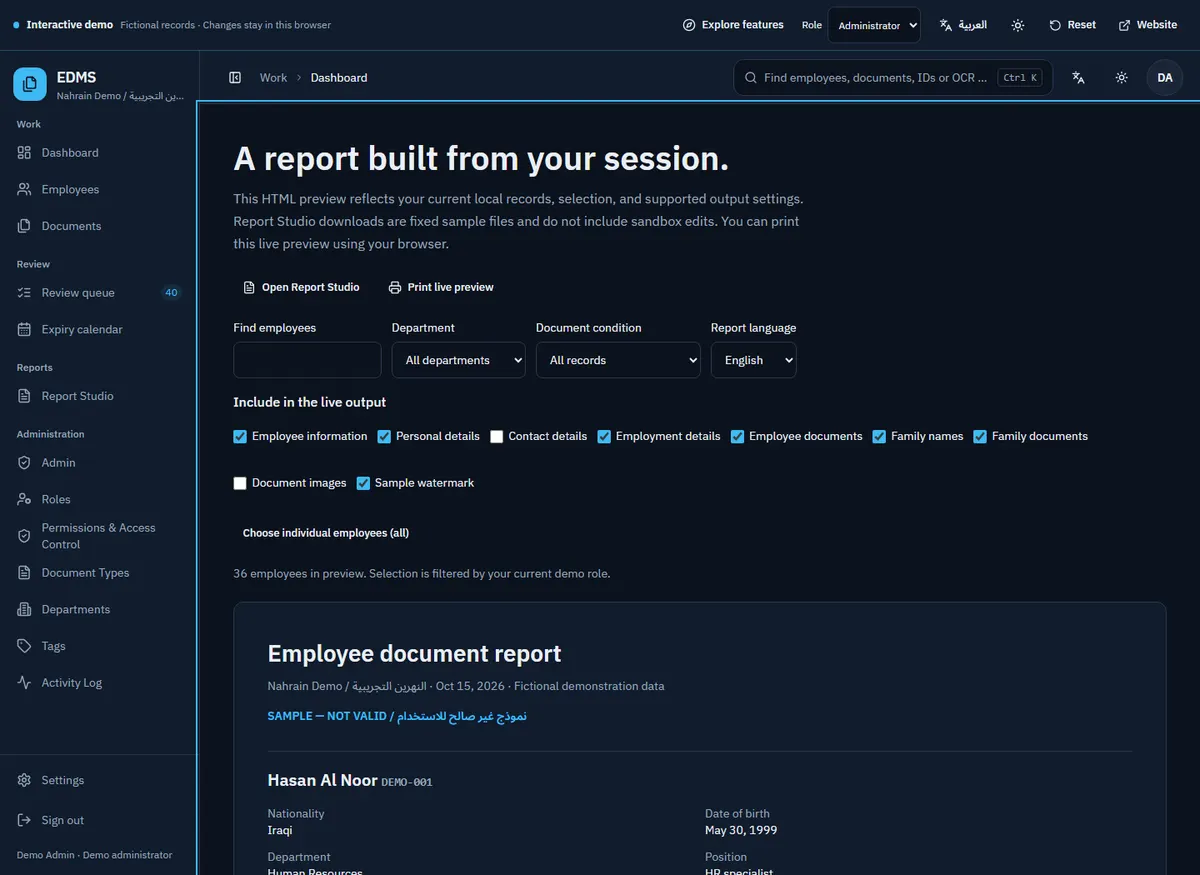
Select employee and document records intentionally. Filters and a persistent selection summary make the scope clearer before a report is generated or downloaded.
Explore report controls for layout, document inclusion, branding, and output formats. See how the available settings support different review and handover needs.
Review an HTML representation of the current local selection. Sample downloadable files demonstrate output formats while making their fixed example content explicit.
Start with the sample and follow the path through the actual workspace.
No. Example downloads are fixed, labeled artifacts. Use the HTML preview to inspect supported local selections.
The application has branding and report controls. Explore the preview and discuss the required output during installation.
The demo does not send records anywhere. Production report processing depends on the installed architecture and configured services.
Tell me how your documents move today. We’ll discuss the installation, the workflow, and what needs to fit.
Please leave employee documents, passwords, and sensitive records out of your email.